 Proxymity
Inside Resolve
Works in DaVinci Resolve Studio 21 or higher from Workspace > Scripts > Proxymity.

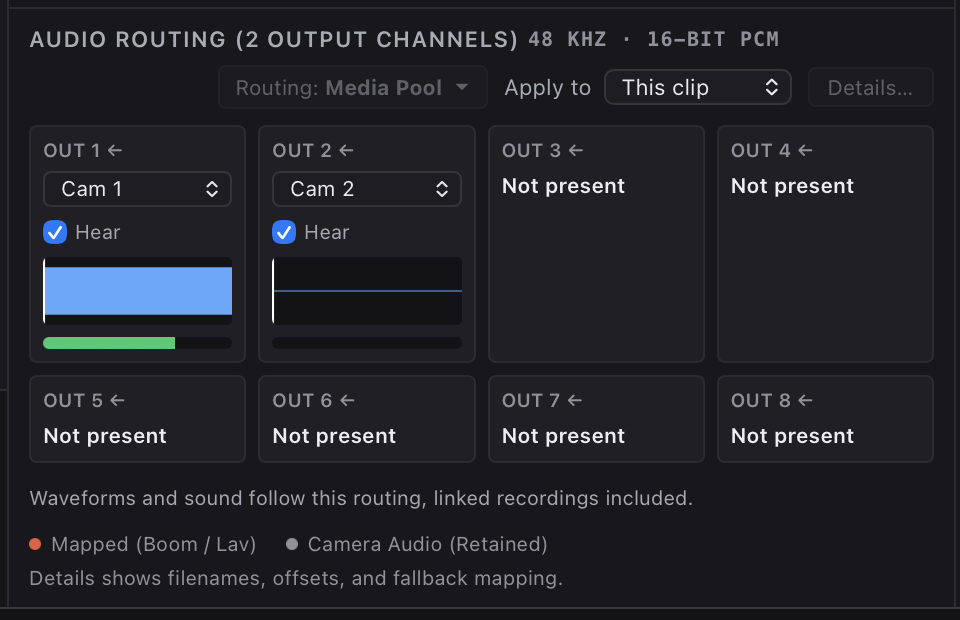
Select Media Pool clips, review audio routing, choose output folder and profile, and generate locally from Workspace > Scripts > Proxymity.
Download
Or paste this into Terminal
curl -fsSL https://proxymity.moo.llc/get.sh | bash
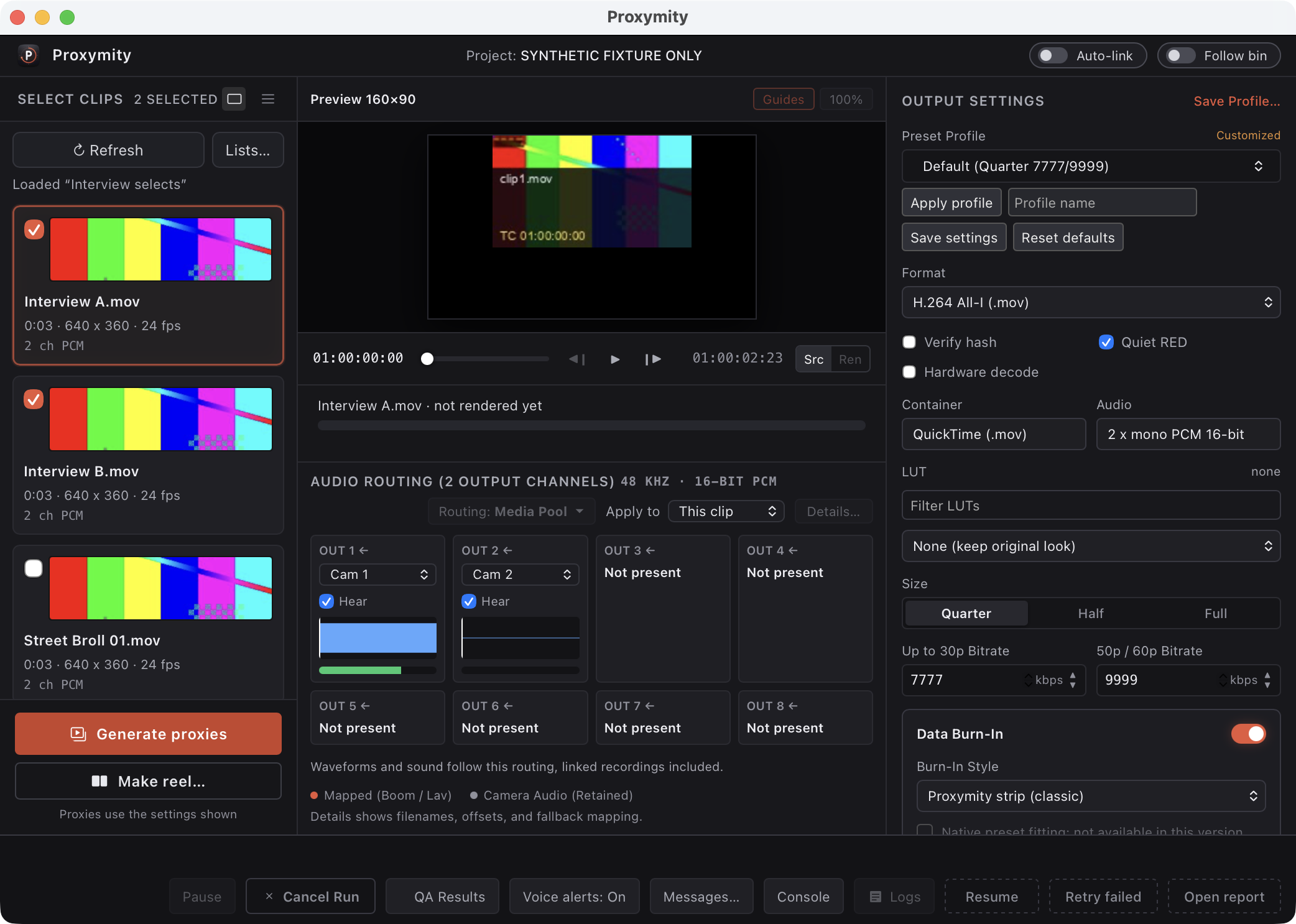
Works in DaVinci Resolve Studio 21 or higher from Workspace > Scripts > Proxymity.
Named profiles and saved settings; quarter, half, and full size; filename and timecode burn-ins.
Progress and ETA, cancel, resume, retry, QA reports and logs.
Keeps the original embedded audio channel count while baking boom, lav, and camera mapping into separate PCM channels.
Outputs keep exact source frame rate and timecode, H.264 all-I with no B-frames.
23.976, 24, 25, 29.97, 30, 50, 59.94 and 60 fps, with drop-frame timecode kept where it applies.
Burn-in styles (classic strip, dailies, minimal, Resolve look) and a choice of fields: source name, timecode, frame number, frame rate, resolution, and custom text. After each encode, a check reads the burned text at three sample frames.
Optional Apple ProRes encoder on a Mac that has it.
Join ticked clips into one dailies file with chapters, CSV and EDL.
Optional auto-link of proxies in Resolve (opt-in, off by default).
RED R3D decode through REDline that you install yourself; Proxymity does not redistribute REDline.
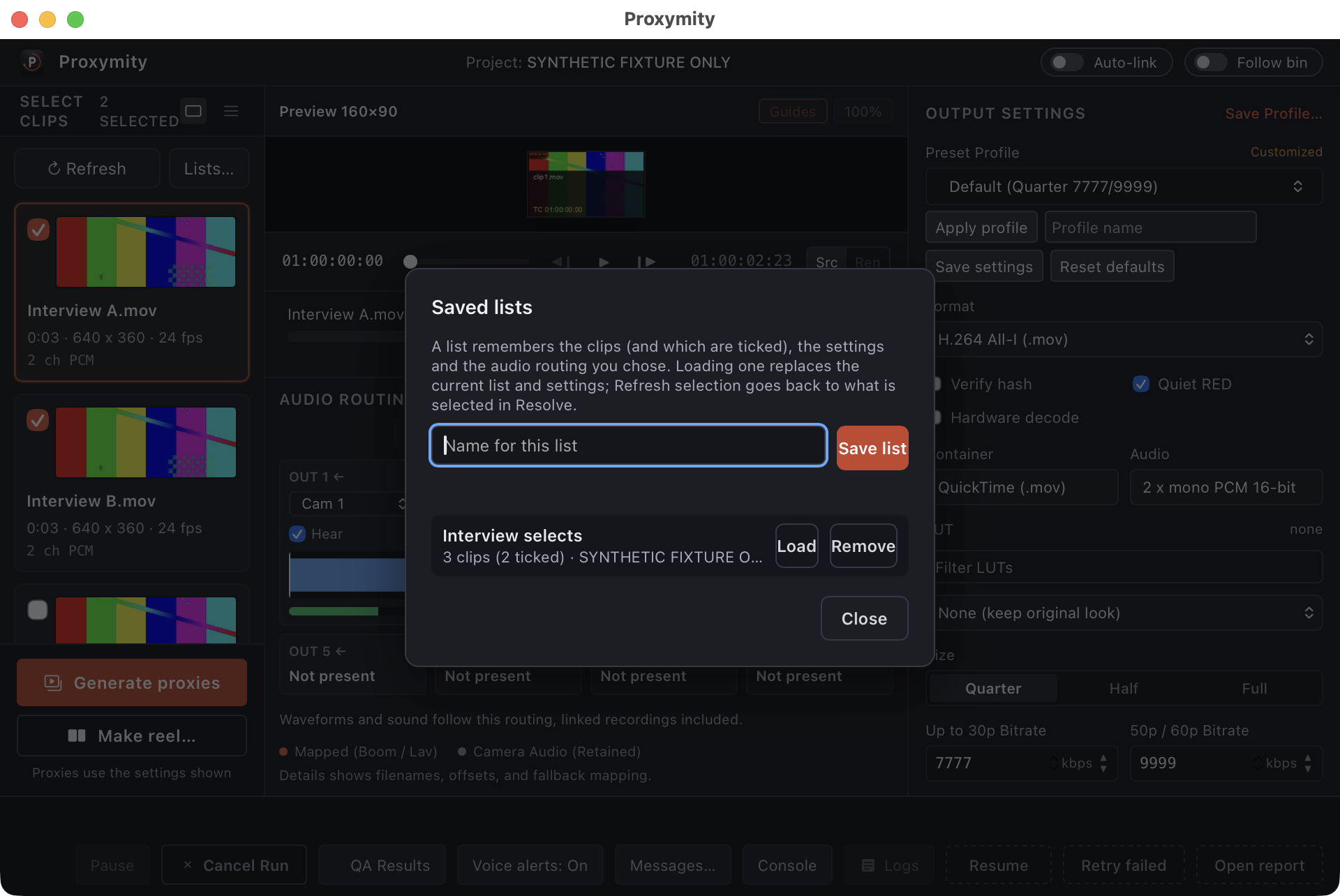
Saved lists for repeatable clip sets and batch workflows.
Runs locally with no per-frame model calls.
Editorial command-line tools: index, search, stringout, view, audio, lint, diff, music-cut.
libx264 encoder. Details in the Windows (beta) section.ffmpeg with the libx264 encoder, for example via Homebrew: brew install ffmpeg.requirements.txt for you.Proxymity 0.9.2 beta for macOS 12 or later (Apple Silicon tested, Intel untested). Needs DaVinci Resolve Studio. A first Windows beta is also available: see Windows (beta).
A first Windows build: version 0.9.2 beta, for 64-bit Windows 10 or 11. Open PowerShell and paste this line:
irm https://proxymity.moo.llc/get.ps1 | iex
Requirements:
ffmpeg with the libx264 encoder.Beta: not yet tested on a physical PC by the author. The download is not signed, so Windows SmartScreen may warn when you run it.
Recommended: run the one-liner in Terminal (downloads and runs the installer):
curl -fsSL https://proxymity.moo.llc/get.sh | bash
Manual route:
Install Proxymity.command, or run bash install.sh from that folder in Terminal.Install Proxymity.command and choose Open, because the app is not signed by Apple and macOS may otherwise refuse to open it.Proxymity is a proxy builder for DaVinci Resolve Studio on macOS. You run it from Workspace > Scripts > Proxymity, select Media Pool clips, and generate H.264 editing proxies with controlled audio routing and burn-ins.
Free to use. All rights reserved. There is no subscription for Proxymity itself.
The proxy builder reads the clips you select and writes proxy files to the folder you choose. The one thing it can write to your project is auto-link, which is off by default. When you turn it on, Proxymity links each finished proxy to its clip. It leaves a clip alone if Resolve already has a proxy linked, and it undoes the link if the clip's audio mapping changes. The editorial command-line tools are separate and write to Resolve only when you run them for that: stringout builds a timeline with markers and saves the project, and the audio tool changes clip gain only with its apply option.
You choose the output folder in the app for each run. The app itself lives under your Library Application Support folder after install, with logs and data beside it.
From the unzipped download folder, run bash uninstall.sh. It moves the installed app files and the Resolve launcher script to the Trash. It does not delete anything with rm.
The curl script downloads the current zip, checks its checksum, unzips to a temp folder, and runs install.sh so you do not have to fetch the archive by hand.
Yes, as a first beta: 64-bit Windows 10 or 11, installed with one PowerShell line (see the Windows section). It has not yet been tested on a physical PC by the author.
Data Burn-In draws text into the picture of each proxy: the source file name, the source timecode, the frame number, the frame rate, the resolution, and custom text you type. You choose a style (classic strip, dailies, minimal or Resolve look) and which fields to show. After each encode, a check reads the burned text at three sample frames.
ffmpeg cannot read R3D directly. Proxymity can decode through REDline from REDCINE-X PRO if you installed it. REDline is never redistributed with Proxymity.
No. Encoding runs locally with no per-frame model calls. Editorial tools read your Resolve project on the machine where you run them.
DaVinci Resolve Studio 21 or higher on macOS. The free version of DaVinci Resolve is not supported because it has no external scripting.
The app is built for both Apple Silicon and Intel (macOS 12 or later), but it has only been tested on Apple Silicon. Intel Macs are untested.